This Week: A Cleaner Events Page, Free API Access, and Saved Events
FoxTrail has a calmer events page, saved events for readers, and a free way for developers to build with Flathead Valley event data.
FoxTrail started with a simple problem: too many Flathead Valley events live in too many different places.
A show might be listed by a venue. A workshop might be buried on a library calendar. A city meeting might sit on a municipal site. A community event might only show up after you already knew where to look. FoxTrail brings those scattered listings into one current, source-backed calendar so readers can spend less time hunting and more time planning.
This week’s release moves that same idea forward in three practical directions.
First, the main events page has been redesigned around the way people actually browse: scan the month, notice busy days, then zoom into one day without losing the broader calendar.
For developers, the FoxTrail API is now free to start. That means local sites, experiments, tools, and widgets can begin building on top of FoxTrail event data without paying upfront.
For readers, event pages now include a bookmark button. Signed-in users can save events to their account and come back to them later from a personal saved-events list.
These are small, practical changes on the surface. Underneath, they are important building blocks for where FoxTrail is going: a public event calendar that stays fast and useful for everyone, with account-based tools added only where they make the experience better.
A calmer way to browse the month
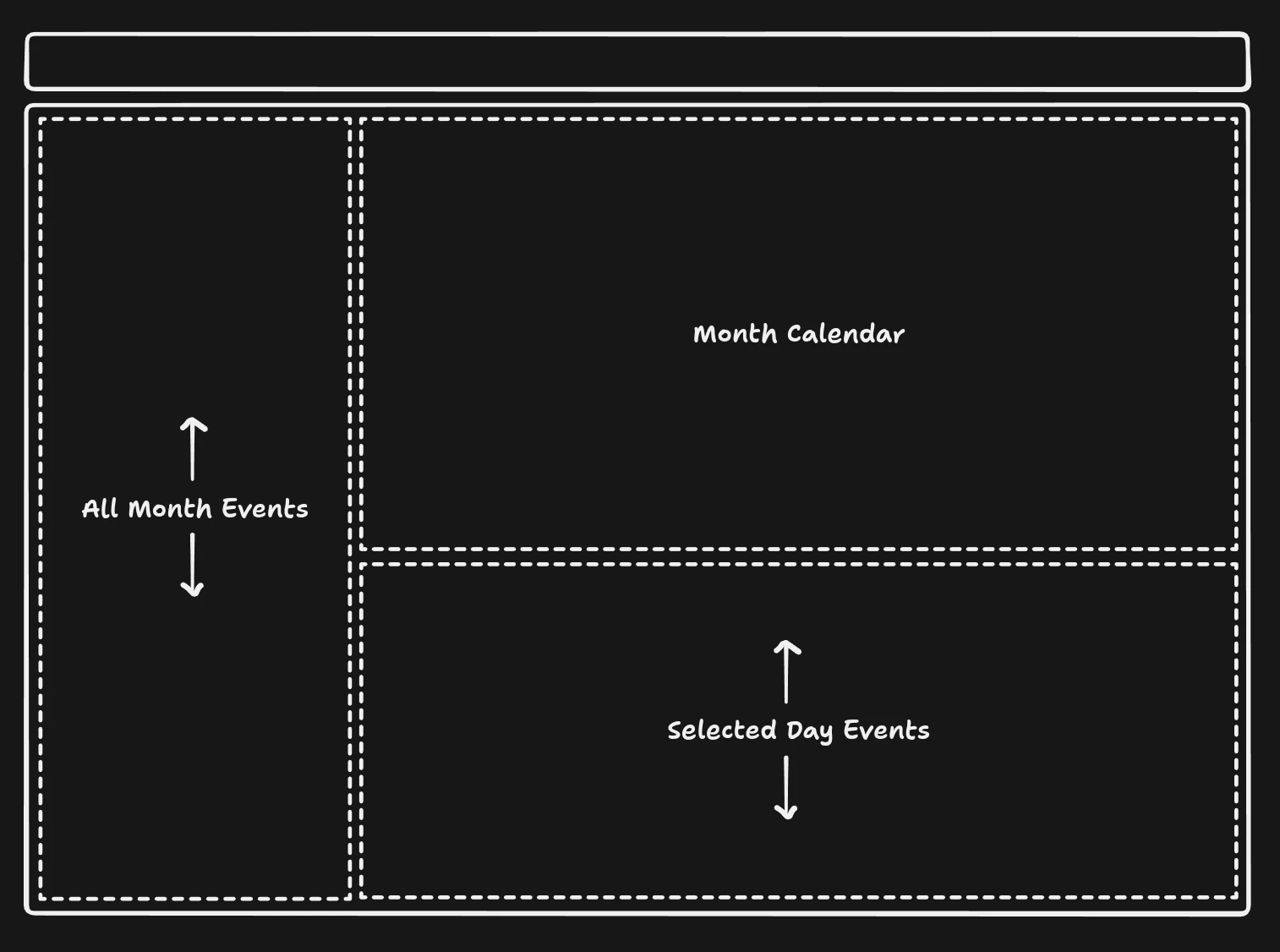
The events page used to ask one view to do too much. It needed to show the month, support filters, keep a list of events nearby, and still make a single day feel easy to inspect.
The redesign gives each job its own space.
On the left, the month list stays steady. It is there for scanning, searching, and paging through what is coming up across the Flathead Valley.
On the right, the calendar shows the shape of the month at a glance. Busy days feel busy. Quiet days stay quiet. You can move month to month without the whole page feeling like it has to start over.
Under the calendar, selected-day events get their own detail area. Tap a date, and the day opens up below the calendar while the month list remains in place. That sounds small, but it makes browsing feel much less jumpy.
The goal was not to make the page fancier. It was to make it feel calmer: one place to scan the whole month, one place to understand the calendar, and one place to focus when a day looks interesting.
Explore eventsSave events you do not want to miss
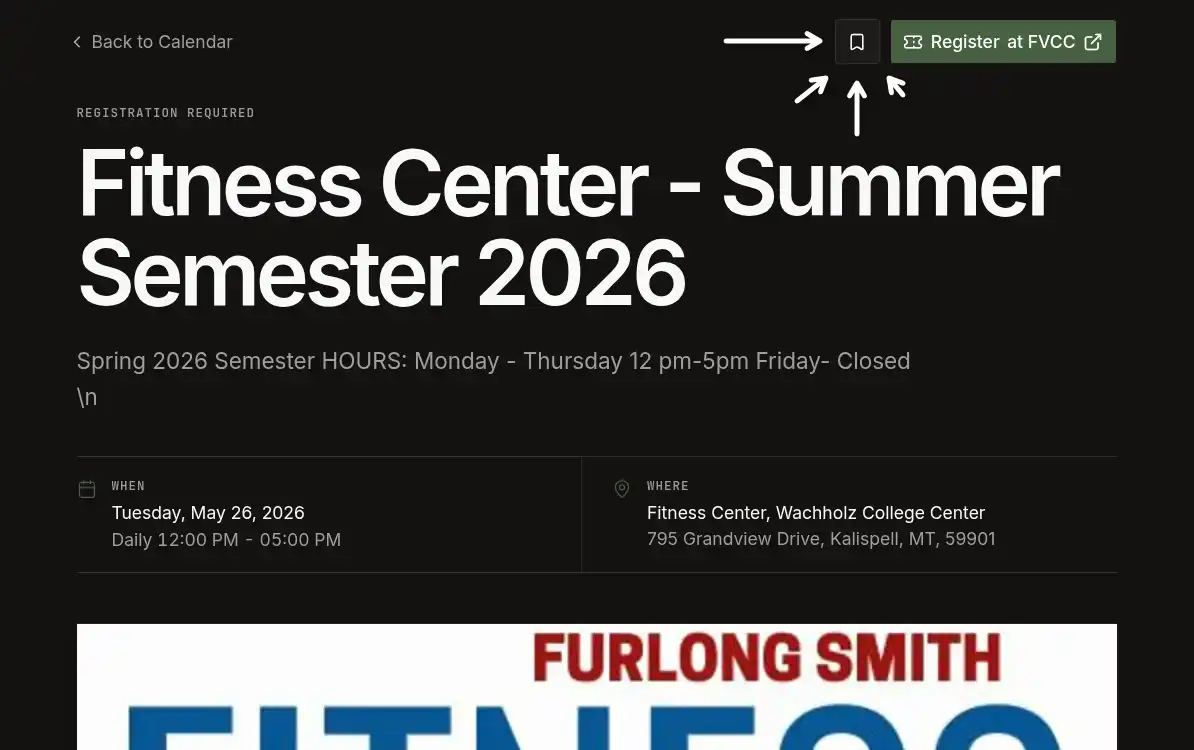
The reader-facing improvement in this release is event bookmarking.
When you are signed in, event pages now include a save button near the main event action. Tap it once and the event is added to your account. From there, you can return to your saved events whenever you are planning your week, comparing options, or trying to remember the name of something you saw earlier.
This first version is intentionally focused. It does not try to turn FoxTrail into a full calendar app overnight. The job is much simpler:
- find an event,
- save it,
- return to it later.
That matters because event discovery is often not a one-session task. You might browse on your phone during lunch, check with a friend later, and come back on your laptop when you are ready to register. A public calendar is good for browsing, but a personal saved-events list is better for follow-through.
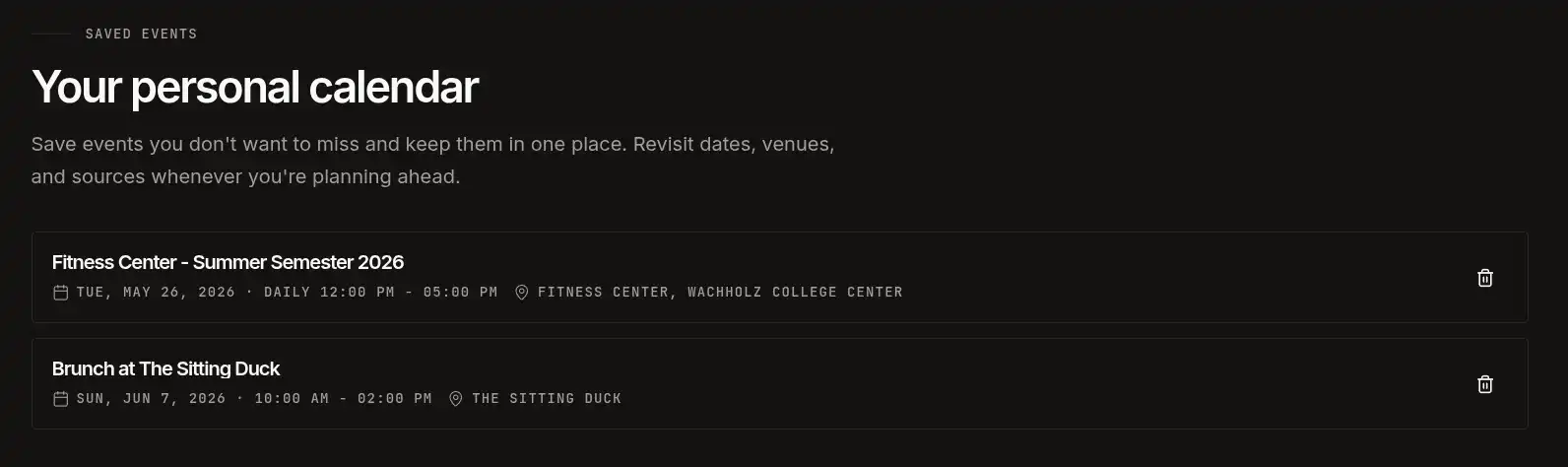
Saved events also make FoxTrail more useful without changing the way the main calendar works. Public browsing still stays open. Event pages still point back to the original source when registration or more context belongs with the organizer. The account layer only appears when it solves a real reader problem: keeping track of the events you care about.
This gives us a clean foundation for future planning features. Reminders, shareable lists, calendar export, and smarter recommendations all become easier once there is a reliable way to say, “I care about this event.” But the first step is deliberately small: save the event and make it easy to find again.
Open your saved eventsStart building with the FoxTrail API for free
The second part of this release is for builders.
FoxTrail now has a free API path for developers who want to test Flathead Valley event data before committing to a paid plan. The goal is to remove the awkward first step. You should be able to create an account, generate a key, make a few requests, and see whether the data fits your project.
The API is built around the same normalized event feed that powers FoxTrail itself. Instead of scraping individual calendars, cleaning inconsistent dates, matching venues, and stitching sources together yourself, you can start from one structured feed.
A typical event can include fields such as title, date, time, venue, source, registration state, excerpt, and image data. The point is not just to expose raw listings. The point is to expose event data in a shape that is predictable enough to build with.
That makes the API useful for projects like:
- a local publication adding an events section,
- a business website showing nearby happenings,
- a tourism or visitor guide,
- a community dashboard,
- an internal research tool,
- a prototype for an event widget,
- or a custom app that needs current Flathead Valley event context.
The free plan is designed for testing and small prototypes. If a project grows, paid plans add more request capacity and more organization keys. That keeps the starting point low-friction while still leaving room for serious integrations.
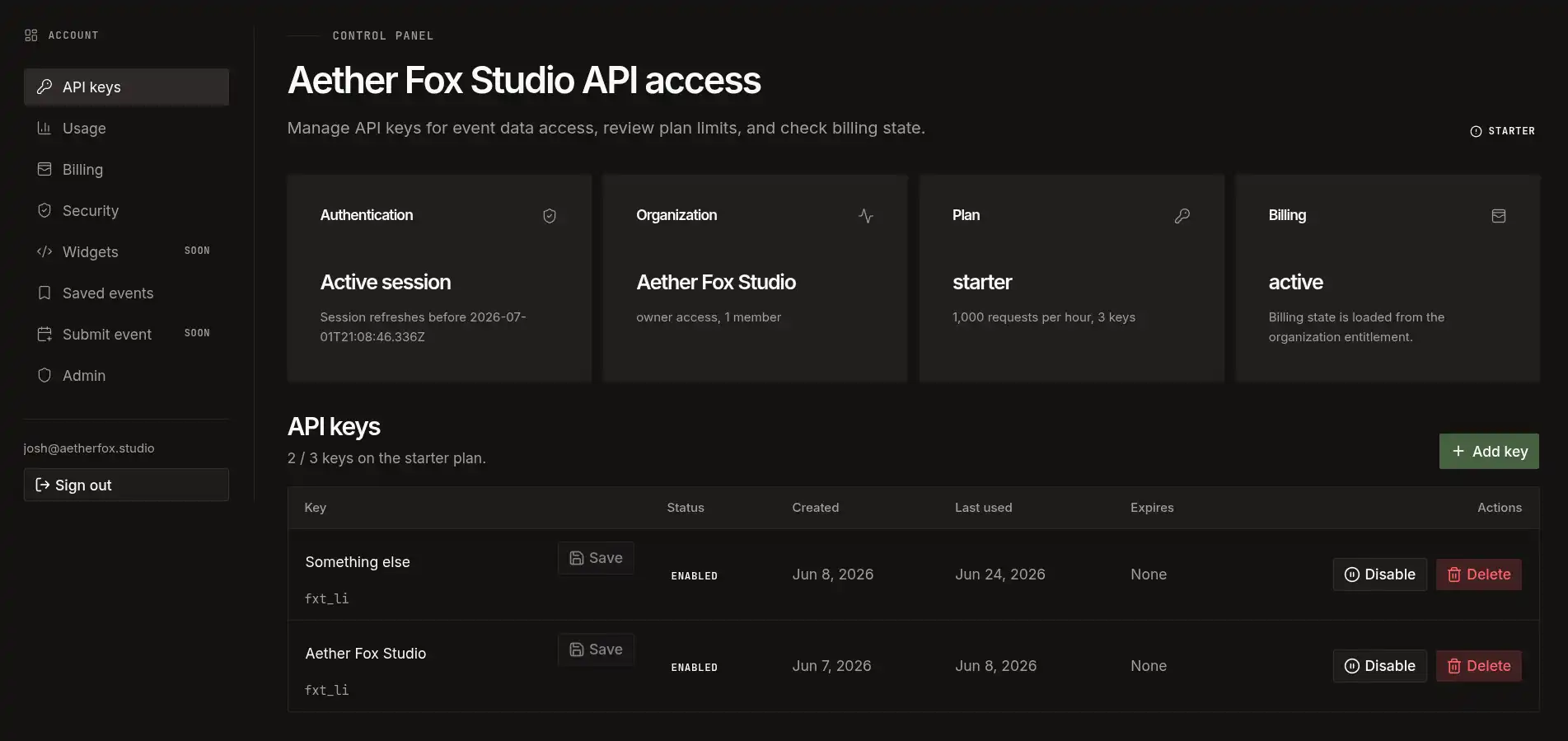
From the account dashboard, developers can create and manage API keys, review plan limits, and confirm billing state. The same control surface is used across plans, even though request budgets and key limits change depending on the tier.
Create an API keyA basic request looks like this:
curl "https://api.usefoxtrail.com/v1/events?from=2026-06-23"
  -H "Authorization: Bearer fxt_..."
And a response follows a predictable structure:
{
  "data": [
    {
      "title": "Example Event",
      "startDate": "2026-06-23T18:00:00.000Z",
      "location": "Kalispell, MT",
      "source": "Example Source"
    }
  ],
  "meta": {
    "total": 1,
    "limit": 25,
    "offset": 0
  }
}
The exact schema will continue to improve as FoxTrail grows, but the direction is clear: one source-backed event graph, exposed through a clean read API, with enough structure to support real products.
Usage metrics are part of the product
Free access is only useful if builders can understand what is happening after they start using it.
That is why the account area also includes API usage telemetry. The usage dashboard gives a quick view of request volume, successful responses, error rate, average response time, active keys, endpoint mix, and failure profile.
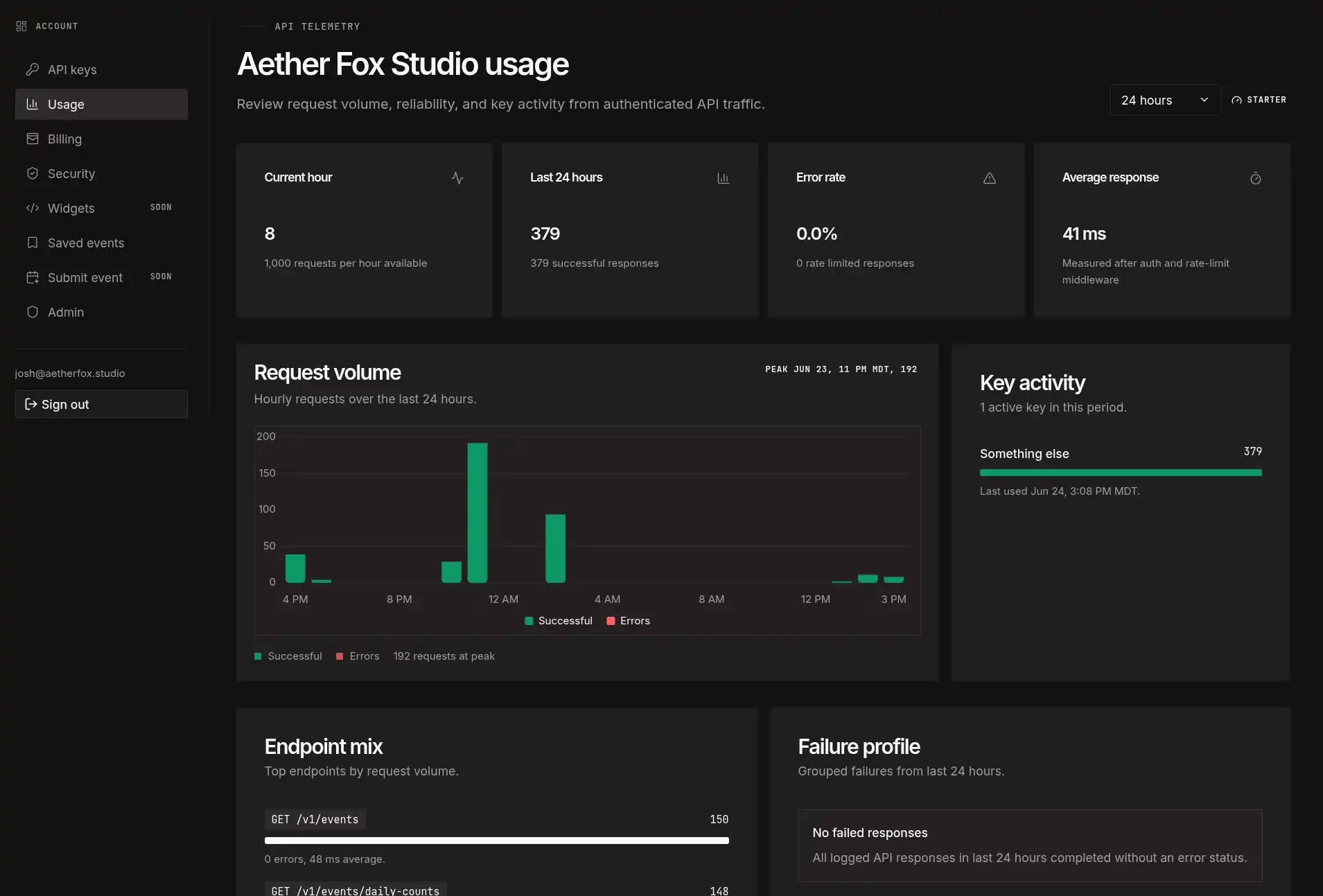
This helps answer practical questions early:
- Is my key active?
- Is traffic coming through?
- Which endpoint am I calling most?
- Am I running into errors?
- Am I approaching my hourly request budget?
- Is the API responding quickly enough for the thing I am building?
For small projects, this keeps debugging simple. For larger projects, it gives teams a clearer path before upgrading. You should not have to guess whether an integration is working or whether your request budget is enough. The dashboard is meant to make those answers visible.
Review API usageWhy these changes shipped together
The redesigned events page, saved events, and free API access serve different audiences, but they are connected by the same product principle.
FoxTrail is not trying to be another closed event silo. It is trying to make local event information easier to find, easier to revisit, and easier to build on.
For readers, that means a cleaner public calendar and a personal place to keep events worth remembering.
For developers, it means a structured feed that can power local sites, widgets, and tools without every team rebuilding the same collection pipeline from scratch.
For organizers and publishers, it means events remain tied back to their original sources. FoxTrail can make discovery easier while still respecting the calendars, venues, chambers, libraries, publications, and community groups where the listings begin.
The long-term value is in the shared pipeline. When the crawler finds new or updated events, the website, saved-event views, API clients, and future embeds can all read from the same source of truth. That keeps the system simpler and keeps event information more consistent across surfaces.
What stays the same
The main FoxTrail calendar remains public. You do not need an account to browse events.
Accounts are for things that need persistence: saved events, API keys, billing, and future tools that depend on knowing who is using them. The public calendar should stay fast, open, and easy to scan.
The source-first model also stays the same. FoxTrail is designed to help people discover events, but the original publisher still matters. When an event requires registration, has changing details, or belongs to a specific organizer, FoxTrail should help you get back to that source quickly.
What comes next
This release gives us a few foundations to keep building on.
For readers, saved events open the door to better planning tools: reminders, calendar export, shared lists, and more useful account pages.
For builders, free API access opens the door to local integrations: publication calendars, sidebar widgets, community dashboards, and partner workflows that use the same event graph behind FoxTrail.
Embeddable widgets are the natural next step. The API gives developers control. Widgets will give site owners a faster drop-in option when they want live Flathead Valley events without designing a custom integration.
Preview embed toolsFor now, the path is simple:
- Browse events.
- Save what you care about.
- Start building for free.
- Upgrade only when your project needs more room.
FoxTrail is built by Aether Fox Studio, a Montana web studio focused on custom digital tools for local businesses and growing teams. If you are building something with Flathead Valley event data, start with the free API plan and see what works.
Less hunting around. More useful local event discovery.